
The assistant uses your actual scan data, agent status, vulnerability findings, and AI insight records to answer infrastructure-specific questions, and references product documentation for how-to queries. It is designed to help teams fully understand their infrastructure and where possible risks might hide.
The scan results can be filtered using date ranges and the various other data fields available for easy viewing. A structured CSV file can also be downloaded for deeper analysis. The CSV file would contain the results of all the scans in different sheets. It improves audit readiness with exportable compliance ready report of scans.
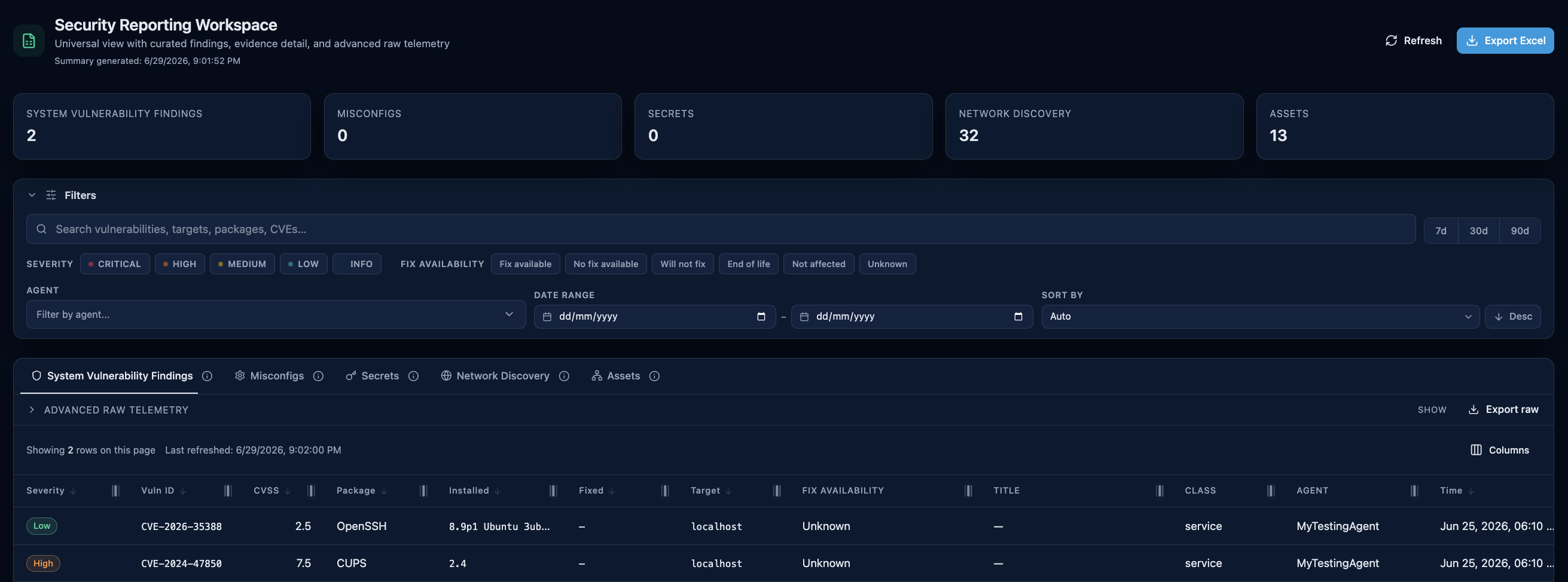 The reporting workspace: summary tiles, curated tabs, filters, and Excel export.
Filters and Sorting
Curated report tabs support search plus tab-specific combinations of severity, state, status, category, and agent filters. Multi-select filters are preserved in the URL so filtered views can be bookmarked or shared.
- Severity is available for vulnerability, misconfiguration, secret, network discovery, and raw fingerprint data.
- State is available for network discovery and raw port scan data.
- Status is available for vulnerability findings.
- Agent filters match agent display names so the same label can be used across curated and raw tabs.
- Sorting is applied on the server for every visible sortable column in the report tables.
Advanced Raw Telemetry
The Advanced section exposes raw port scans, raw asset discovery results, and raw fingerprint runs. These views use the same filter bar as the curated tabs, but they show the original scan records instead of flattened report findings.
Raw fingerprint severity is shown as the highest severity found inside a fingerprint result so severity filters stay deterministic across vulnerabilities, misconfigurations, and secrets captured in the same run.
Export and Audit
Excel exports keep the active row-level filters from the report page. Summary cards remain scoped only by the selected account group and date range, while the worksheet rows reflect the additional report filters.
The workbook still includes the curated report sheets. If export starts from a curated tab, that tab's current sort is applied only to its matching worksheet while the remaining worksheets keep their default ordering. Exports started from advanced raw telemetry keep the filtered curated workbook but do not forward raw-tab sorting into the workbook.
This makes exported data easier to reconcile during investigations, support cases, and audit reviews because the row counts match what operators see in the UI.
Scans covered in reports
Network Discovery
Identifies open ports and services to drive vulnerability detection and analysis.
Service Fingerprinting
Assesses security posture by identifying known CVEs in installed packages and services, detecting common misconfigurations and scanning for exposed secrets. Results of a Service Fingerprinting scan are split into three sheets for easy visibility and analysis:
- Misconfiguration Findings
- Vulnerability Findings
- Secret Findings
Asset Discovery
Does ARP sweeps, local process enumeration and MAC vendor lookup.