
The GDPR CyfroCompliance page provides an automated, evidence based assessment of your security posture against GDPR oriented technical control categories.
It combines scan evidence, agent test-run summaries, category scoring, finding severity, control catalog provenance and coverage metadata so teams can track risk and remediation readiness. Customer-visible controls are backed by executable technical checks; controls that cannot be evaluated from available evidence are marked not evaluable instead of treated as passing.
Accessing GDPR CyfroCompliance
- Use the GDPR CyfroCompliance widget for a compact summary.
- Open the full GDPR CyfroCompliance page for category-level findings and catalog details.
Data Scope and Source
The GDPR report is generated from recent account-group evidence already stored by CyfroSec, including:
- Network Discovery data
- Fingerprint/vulnerability scan data
- Asset Discovery data
- Endpoint-agent coverage and test-run summaries
- Bounded correlated relationship summaries
By default, the page shows account-group aggregate compliance posture. If no account group is selected, the page prompts you to select one.
Page Overview
The full page includes:
- Header and Controls
- Overall Score
- Scan Data and Catalog Metadata
- Category Breakdown with Drill-Down Findings
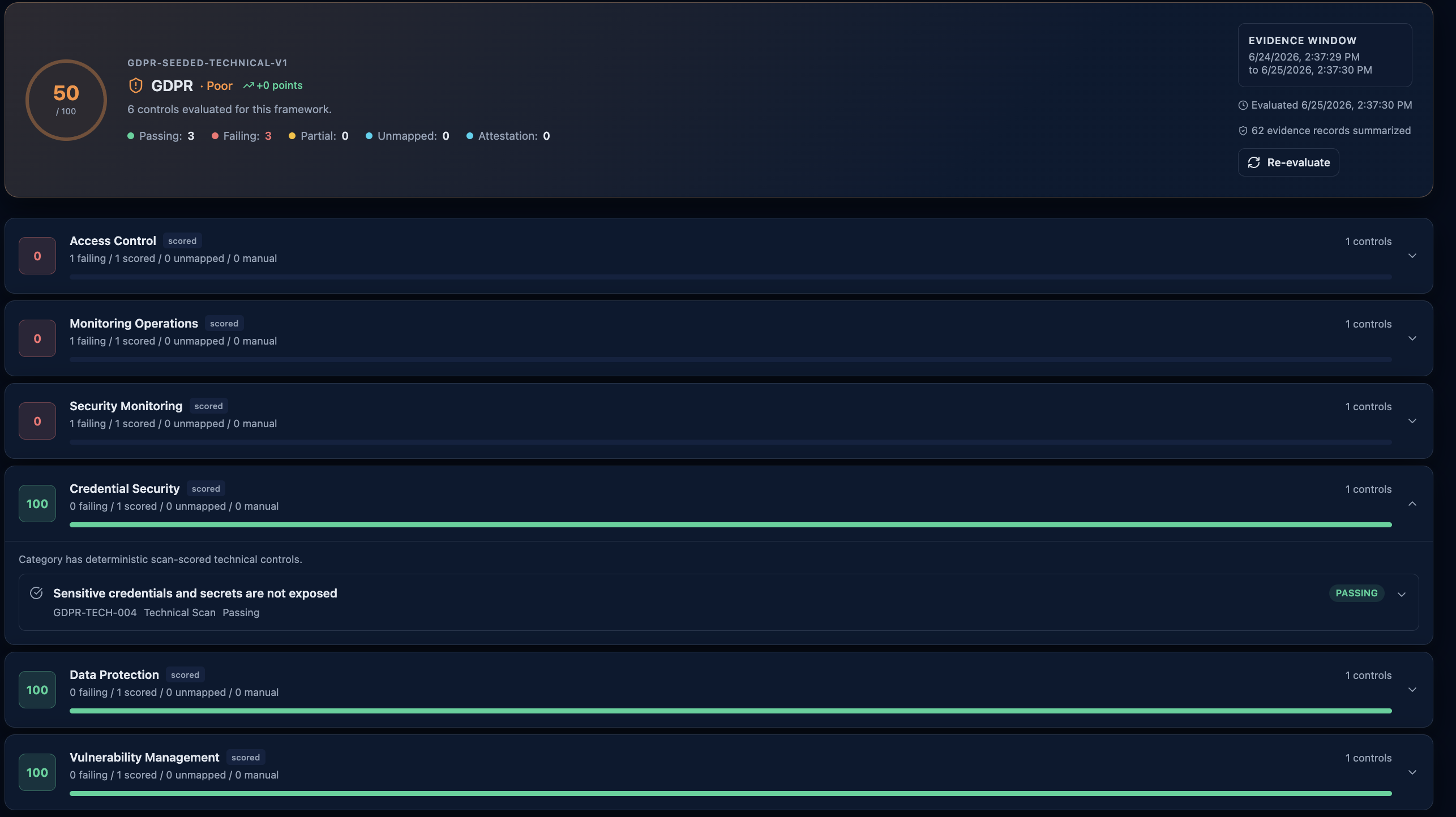 The full GDPR page: overall score, evidence window, and per-category control scoring with drill-down findings.
Header and Controls
Top actions:
- Refresh: Triggers report recalculation for the selected account group and reloads the page data.
- Refresh Catalog: Reloads report/catalog status. Catalog imports and remapping are CyfrOne admin operations and are not required for normal customer reporting.
The header also shows report timestamp and account-group context.
Overall Score
The top panel displays:
- Overall score (0-100)
- Score label (for example: Excellent, Good, Needs Improvement, Poor, Critical)
- Trend delta when historical points are available
- Critical, High, and Total finding counts
- Evidence coverage percentage
- Not-evaluable control count
Scan Data Window
When available, the page displays the report's scan data time window:
- Window start timestamp
- Window end timestamp
This helps confirm the evidence period used for evaluation.
Category Breakdown
Each category card shows:
- Category name and GDPR article reference
- Category score
- Finding count
- Severity breakdown chips
- Expand/collapse interaction
Categories are sorted by score (lower scores first) on the full page to surface higher-priority gaps.
Severity Filter
You can filter visible findings by severity: All, Critical, High, Medium, Low, Info. Selecting a severity auto-expands categories that contain matching findings.
Finding Details
Expanded findings include:
- Title and affected asset/resource
- Severity
- GDPR article reference
- Description
- Remediation guidance
Catalog Provenance and Health
The page includes a catalog section to show how controls were evaluated.
Catalog Provenance
Displays:
- Catalog version
- Catalog generation timestamp
- Source summary cards (display name, authority/type, status)
- Seeded curated catalog metadata, when the active version was created from the built-in executable catalog pack
- Mapping pack version and deterministic source fingerprint, when available
Catalog Health
Displays:
- Control count
- Source count
- Evaluation mode
- Sync/import status for CyfrOne-managed catalog operations
- Not-evaluable count for controls missing sufficient evidence
This metadata supports auditability and trust in control mapping.
Seeded Technical Catalogs
CyfroSec ships deterministic executable compliance catalogs for GDPR, CCPA/CPRA, SOC 2, and NIST CSF. Each customer-visible control maps to at least one technical check function so the UI can show whether the available evidence passes, fails, or is not evaluable.
ISO/IEC 27001 source metadata may exist for CyfrOne administrators, but it is not shown to customers until CyfroSec has an approved executable control pack for that framework.
Widget vs Full Page
Dashboard Widget
The dashboard GDPR card provides a compact snapshot:
- Donut score
- Trend delta
- Critical/High/Total quick counters
- Category score mini-bars
- Manual refresh button
Full GDPR CyfroCompliance Page
Use the full page for:
- Severity filtering
- Category-by-category finding drill-down
- Catalog provenance and health
- Evidence coverage and not-evaluable controls
- Scan data window review
Empty, Pending, and Error States
- No Account Group Selected: Prompt shown to select an account group first.
- No Report Yet: If no report exists yet, the page shows an empty state and allows manual generation via Refresh.
- Pending/Timeout Cases: If processing is still underway or times out, the UI may show a wait-style message indicating report generation is in progress.
- Error State: If loading fails, an error panel appears with retry capability.
Frequently Asked Questions
What does evidence coverage mean? It indicates how much of the control set had sufficient scan evidence for evaluation.
What are not-evaluable controls? Controls that could not be reliably evaluated from the available evidence window.
Why does score sometimes drop after new scans? New evidence can surface additional findings or change control outcomes.
Why is a framework missing from the compliance page? Frameworks are shown only when they have a published executable catalog. Source-only frameworks are hidden until their controls have approved technical checks.