
CyfroAgent is a lightweight daemon that performs asset inventory (processes, filesystems, local SBOM collection), exposes host telemetry and executes targeted scans and fetches secrets and misconfigurations during scheduled discovery.
This guide explains how to prepare, register, deploy, and verify CyfroAgent.
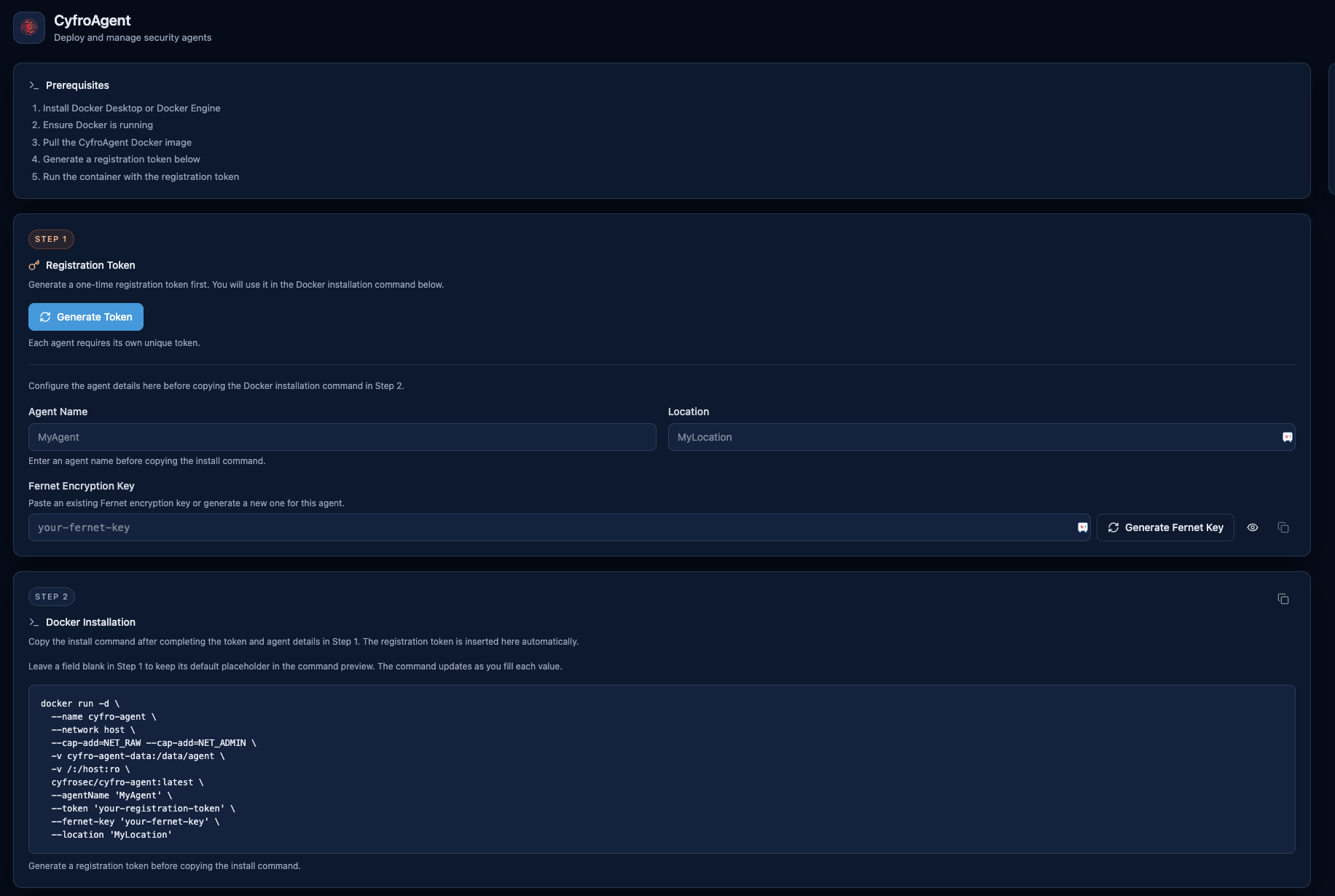 The CyfroAgent setup flow: prerequisites, a one-time registration token, and the generated Docker run command.
Accessing CyfroAgent
The page includes:
- Setup prerequisites
- One-time token generation
- Install command template
- Registered agent health list
Prerequisites
Before deployment, ensure all of the following are ready:
- Active CyfroSec account and organization access.
- At least one Account Group created.
- Admin rights on the host where CyfroAgent will run.
- Docker available on the target host (Docker Engine or Docker Desktop).
- Outbound network access from the host to your CyfroSec deployment endpoints.
Recommended preparation:
- Identify a clear agent name convention (for example: Linux_Prod_Server_2).
- Decide on location labels used by your team.
- Validate that the intended scan target path is readable when mounted.
Step 1: Select Account Group Scope
CyfroAgent registration is account-group scoped.
- In the portal, select the target account group.
- Open the CyfroAgent page.
- Confirm that you are in the correct environment before generating tokens.
Step 2: Generate a Registration Token
From the CyfroAgent page:
- Click Generate Token.
- Copy the token immediately.
- Use one token per agent deployment.
Token behavior:
- Single-use by design.
- Time-limited (the UI shows expiration).
- Regenerate for each additional host.
Note: If token generation fails with permission errors, ensure you are using an administrator role with access to token creation.
Step 3: Generate a Fernet Key
From the CyfroAgent page, generate the Fernet encryption key that the agent uses to protect its stored credentials. Keep this key safe — it must remain the same across restarts.
Step 4: Run CyfroAgent (Docker)
Copy the docker command from the CyfroAgent tab of the CyfroSec portal after entering values for the requested parameters. A sample command has been provided below for which the parameter values have to be replaced:
docker run -d \
  --name cyfro-agent \
  --network host \
  --cap-add=NET_RAW \
  --cap-add=NET_ADMIN \
  -v cyfro-agent-data:/data/agent \
  -v /:/host:ro \
  cyfrosec/cyfro-agent:latest \
  --agentName "MyAgent" \
  --token "your-registration-token" \
  --fernet-key "your-fernet-key" \
  --location "MyLocation"
| Parameter | Description |
|---|---|
| --fernet-key | Encryption key provided by CyfroSec (must remain the same across restarts) |
| --agentName | Display name for your agent in the CyfroSec platform |
| --token | One-time registration token provided by CyfroSec |
| --location | Label for the agent's location (e.g. Production, Office-NYC) |
Step 5: Verify Agent Registration
A successful startup looks like:
Agent not registered, registering now...
Agent registered successfully.
Starting agent.
Performing initial backend synchronization...
Scheduler started with APScheduler
After agent startup:
- Return to the CyfroAgent page.
- Check the Registered Agents panel.
- Confirm the agent appears with recent last-seen timestamp.
Typical status behavior:
| Status | Meaning |
|---|---|
| Online | Recent heartbeat |
| Idle | Stale heartbeat but not fully offline |
| Offline | No recent heartbeat or disconnected |
If agent does not appear:
- Verify token was unused and not expired
- Confirm container started successfully
- Check outbound network reachability
- Generate a new token and redeploy
Managing the Agent
View logs:
docker logs -f cyfro-agent
Stop the agent:
docker stop cyfro-agent
Restart the agent:
docker restart cyfro-agent
Start the agent after a reboot (already registered):
docker start cyfro-agent
Re-register the agent — if you need to start fresh, remove the container and its data volume, then run again with a new token:
docker stop cyfro-agent && docker rm cyfro-agent
docker volume rm cyfro-agent-data
Then repeat Step 2 with a new registration token.
Updating to a New Image Version
If you already have the agent running with an older image and want to update to the latest version, follow these steps. Your credentials are preserved in the volume, so no re-registration is needed.
Step 1: Stop and remove the old container
docker stop cyfro-agent && docker rm cyfro-agent
Do not remove the cyfro-agent-data volume. It holds your agent credentials.
Step 2: Pull the latest image
docker pull cyfrosec/cyfro-agent:latest
Step 3: Run the agent with the new image
The agent will detect the existing credentials in the volume and skip registration automatically.
On a Linux server:
docker run -d \
  --name cyfro-agent \
  --network host \
  --cap-add=NET_RAW \
  --cap-add=NET_ADMIN \
  -v cyfro-agent-data:/data/agent \
  -v /path/to/your/code:/scan-target:ro \
  cyfrosec/cyfro-agent:latest
On macOS (local development):
docker run -d \
  --name cyfro-agent \
  --cap-add=NET_RAW \
  --cap-add=NET_ADMIN \
  -v cyfro-agent-data:/data/agent \
  -v /path/to/your/code:/scan-target:ro \
  cyfrosec/cyfro-agent:latest
Note: macOS does not support --network host. The agent will use Docker's default bridge network instead.
Step 4: Verify the update
docker logs -f cyfro-agent
You should see:
Agent already registered. Skipping registration.
Starting agent.
Performing initial backend synchronization...
Scheduler started with APScheduler
Important Notes
- Do not delete the cyfro-agent-data volume unless you intend to re-register. It contains the agent's encrypted credentials.
- The CYFRO_FERNET_KEY must remain the same across restarts. Changing it will require re-registration.
- Registration tokens are one-time use. Contact CyfroSec for a new token if needed.
- The agent runs scans periodically in the background. No manual intervention is required after setup.
Integration with Scans
CyfroAgent is required for scheduled scan execution.
Before creating scans, ensure at least one agent is registered in the target account group.
Verification Checklist
- Docker running on host.
- Token copied exactly and still valid.
- Correct account group context selected before token generation.
- Host can reach CyfroSec endpoints.
- Container logs show successful startup and registration.
- Agent appears in CyfroAgent page and then in Agent Status widgets.
Frequently Asked Questions about CyfroAgent
Can one token register multiple agents? No. Tokens are single-use.
Can I regenerate tokens any time? Yes. Generate a fresh token for each new deployment.
Why is my agent listed as Offline? Most commonly heartbeat delay, network interruption, or container stop/crash.
Do I need an account group before deploying? Yes. Registration is scoped to an account group.